
What Is Microsoft Copilot and How Does It Actually Work?
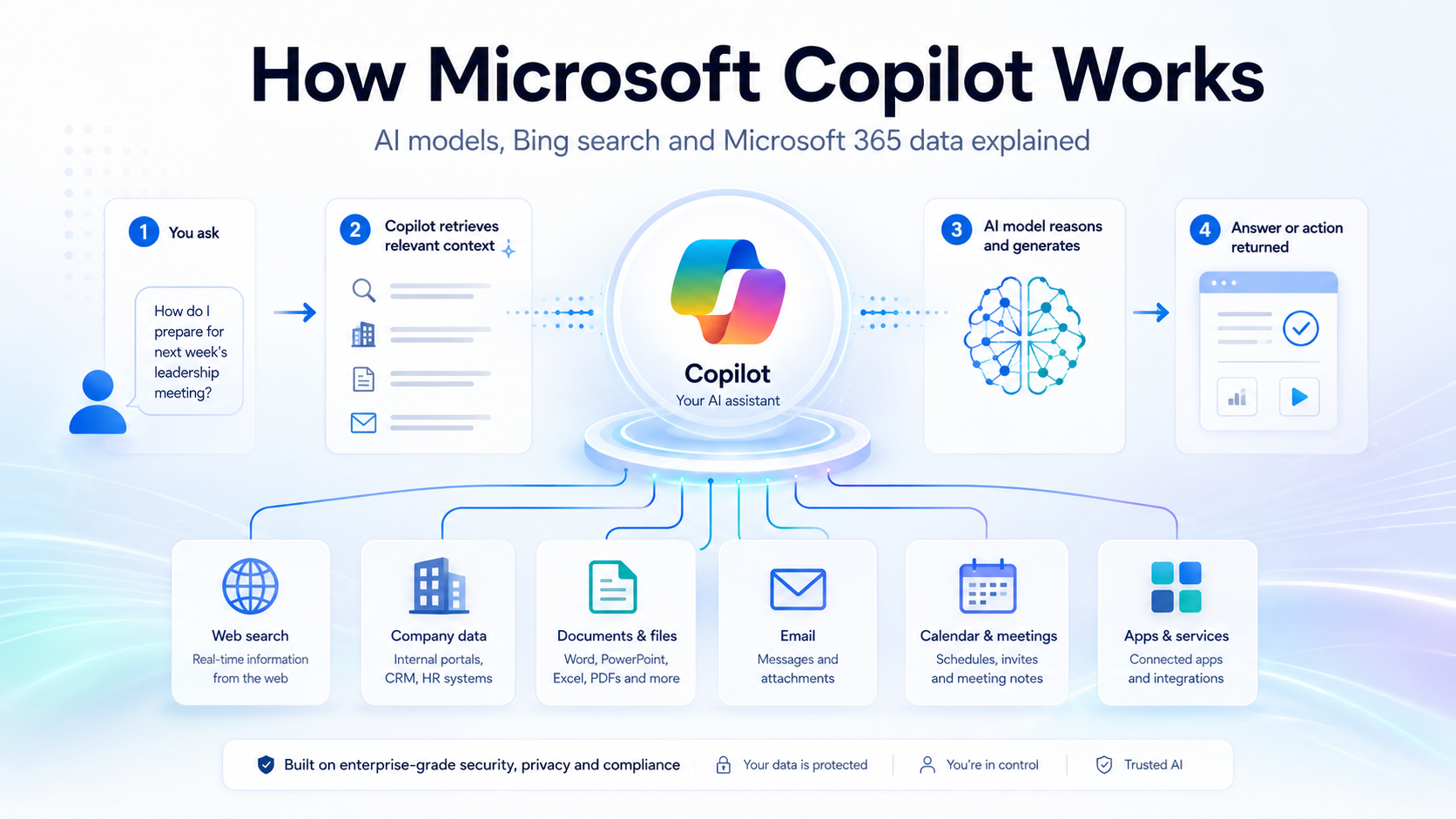
Microsoft Copilot is basically an AI assistant layer plugged into several systems, not just “one AI model.”
At a simple level, Copilot works like this:
User prompt → Copilot orchestration layer → AI model → grounding sources → answer/action
The important parts are:
1. The AI model
Copilot is powered by large language models. Microsoft has historically used OpenAI models through its partnership with OpenAI and Azure AI infrastructure, but Copilot is not limited conceptually to one model forever. Microsoft also now uses a broader model ecosystem in some Copilot/agent contexts. So it is better to think of Copilot as a product interface and orchestration system, not simply “ChatGPT with a Microsoft skin.”
2. Bing / web grounding
For general web questions, Copilot can use Bing Search to ground answers in current web information. Microsoft says Microsoft 365 Copilot and Copilot Chat can generate search queries that are sent to Bing to ground responses in web data. Those web search queries are handled with user and tenant identifiers removed.
So yes, Bing can feed Copilot with fresh public information, especially when the answer needs current or web-based context.
3. Microsoft Graph / business data
For Microsoft 365 Copilot, the big difference is that it can connect to your organisation’s Microsoft 365 data: emails, Teams chats, calendar, SharePoint files, OneDrive documents, meetings, etc. Microsoft describes Microsoft 365 Copilot as combining LLMs with Microsoft Graph and Microsoft 365 apps, so the answer can be anchored in your work context.
That means a workplace Copilot answer may be based on:
Word documents
Excel files
PowerPoint decks
Outlook emails
Teams meetings and chats
SharePoint/OneDrive content
Calendar context
Public web data, when enabled
4. The “Copilot mechanism”
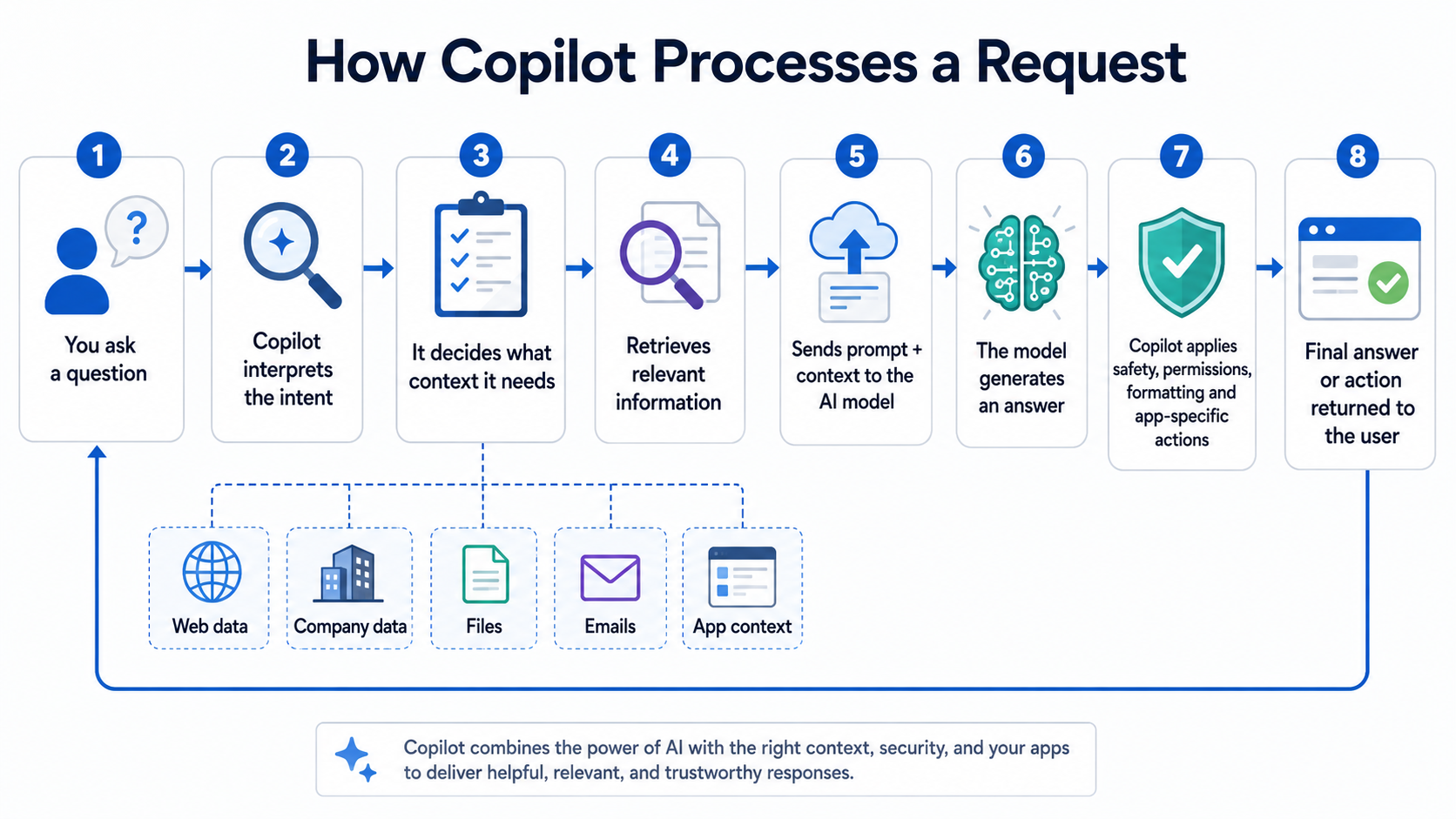
The mechanism is not simply “ask OpenAI and return answer.” It is more like an AI orchestration engine:
You ask a question.
Copilot interprets the intent.
It decides whether it needs web data, company data, files, emails, or app context.
It retrieves relevant information.
It sends the prompt plus context to an AI model.
The model generates an answer.
Copilot applies safety, permissions, formatting, and app-specific actions.
For example, in Word, Copilot may draft or rewrite content. In Excel, it may analyse tables. In Teams, it may summarise a meeting. In Outlook, it may draft a reply. The model is doing the language reasoning, but the Copilot layer connects it to the Microsoft environment.
5. Is Copilot “using OpenAI and Bing”?
Yes, broadly:
OpenAI models have been a major part of Microsoft Copilot’s AI capability.
Bing is used for web grounding and fresh public information.
Microsoft Graph is used for your organisational/personal Microsoft 365 context.
Azure provides much of the secure cloud infrastructure.
But the most accurate explanation is:
Copilot is Microsoft’s AI assistant framework that uses LLMs, Bing/web grounding, Microsoft Graph, and app-specific integrations to generate answers and perform tasks.
Ready to go?
Book a demo with our team to see how Luciqo measures your brand in AI.